
Digital Networking Experience
Helping students transitioning from high school to college use networking to navigate their future career options
UX Design | January to May 2020
Collaboration with Microsoft
The Microsoft Worldwide Learning Innovation Studio is a team of designers, engineers, and researchers at Microsoft that runs innovation sprints to explore new ideas and market opportunities.
Working with Microsoft, our team of seven designers set out to understand how students plan, prepare for, and begin executing on their careers — from before choosing a major to landing a full-time job after graduation. We found that students preparing to transition from high school to college lack resources that ease anxiety in networking situations and clear up misconceptions about job roles.
Our brief: explore how this journey changes across cultures, keep a strong emphasis on networking, and design a digital experience for students.
My Contributions:
Scoped our team’s design space to narrow the project focus
Conducted secondary research to frame the problem space
Conducted primary research and user interviews to understand the user journey
Developed wireframes to test with users
Ran A/B testing with primary stakeholders
Iterated toward the final prototype
Created slide decks to present deliverables to peers and project sponsors
Our Solution

Ambassador Profile
To balance readability between the header and body text, we planned to reorganize the information displayed on the ambassador's job experience cards.

Color Accessibility
We opted for a pastel color palette which sacrificed accessibility. We intended to take another look at our color palette to choose colors that better fit within accessibility standards.

Class Difficulty Dots
During testing, participants were confused by the three dots in the lower left of each class card, indicating the class's level of difficulty. We planned to remove these dots and instead present the information on the split screen view, where more space is available.

"Active" Indicator
We discovered that our users would feel incentivized to chat with an ambassador if he or she was online at the moment. Thus, we planned to add an "Active" indicator to the ambassador's profile page instead of only indicating when the ambassador is offline.

Saved Templates
Originally, we had planned to include the ability autofill a pre-saved template into the chat interface, but this was hard to digest for testing participants. We planned to omit this feature, as it detracted from the natural flow of conversation and did not fit into every chat scenario. Regardless, we would present this concept to Microsoft for future consideration.
Conducting Interviews
To learn more about students' experience transitioning from high school to college, we interviewed three groups.

Takeaways
When deciding on a major, high school students often consider career paths of interest and research the career prospects in that area
High school students are often unaware of what college majors actually involve, despite in-depth research using campus resources
Students prefer online platforms to in-person networking: they give them time to think about what to say, let them network on their own time and terms, and offer more control over the situation
Many college students would have switched majors if they had understood the job prospects before it felt too late to switch
The educational consultant noted that networking is all about connections — you never know where a conversation will lead
Initial Research
We began with literature reviews to understand the landscape of college and career readiness. The goal of this secondary research was to map the broad scope of the project and narrow in on a specific area.
We brainstormed research questions across college readiness and networking, then synthesized our findings in an affinity diagram to surface general trends.

Research topics included:
Defining culture
Culture and education
Deciding a major
College emotions
Relationships
Attitudes
Early networking
Emotions about networking
College journey
Maturity and drive to network
Current resources and tools
Takeaways
Many students go to college to find something they can be passionate about, while others leave with a degree because they feel they are expected to
Students choose a major based on how much they care about the subject, how well they can do in it, career opportunities, and what they want to do with the major after college
High school students are aware of, but do not fully understand the uses of LinkedIn
“Culture” is an ambiguous and complex word
User Journey
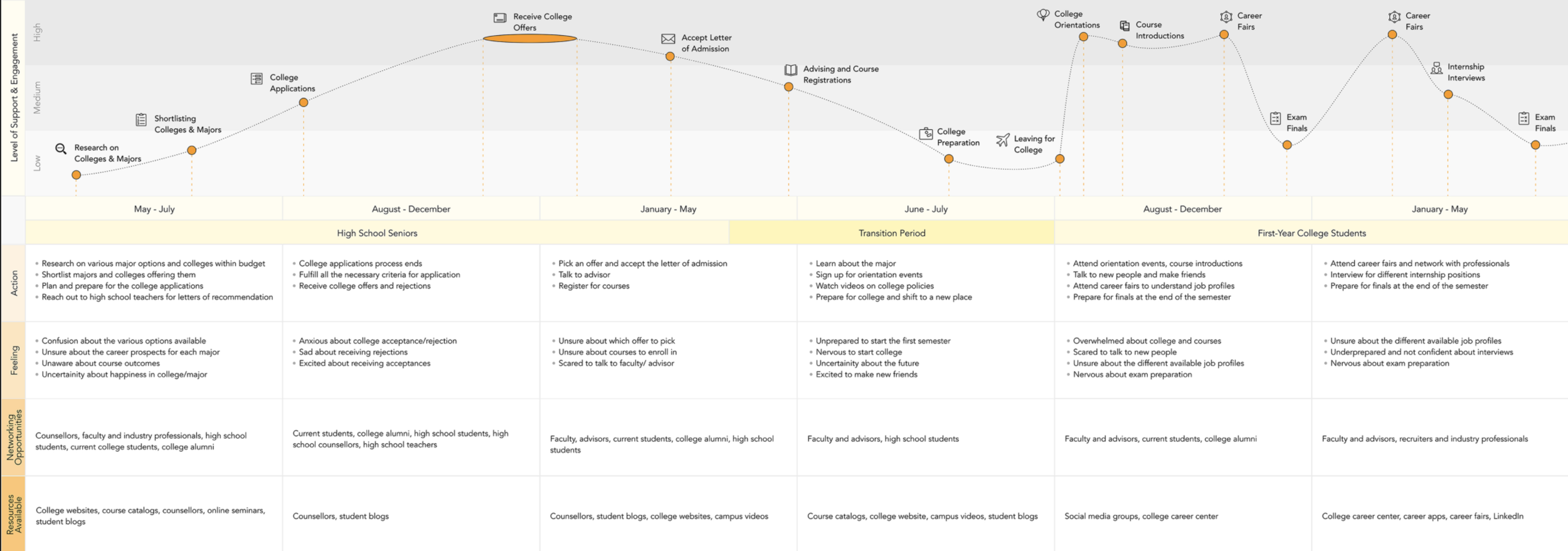
To understand our user in more depth, we drew on prior research and interviews to build a timeline of the high-school-to-college period, mapping how students feel and where they struggle along the way.
Takeaways
There is a significant drop in support and engagement for students between April and July
Students mostly prepare for college on their own, using online resources like course catalogs, campus videos, and student blogs rather than college advisors
Students often network with other students to learn about classes and careers
We identified a large gap in resources available to students, and set out to fill it with our digital experience — captured in the value proposition below.
Value Proposition
Students transitioning from high school to college need resources to understand college majors, meet faculty and students in various areas of interest, and identify future job prospects.
Meet Lena
To ground the work in a real person — her needs, goals, interests, and feelings — we built a persona from our secondary and primary research. Lena doesn't represent every possible user, but she captures one core use case for our design.

Sketching the Website
Using our site map as a guide, we sketched what each screen would look like and what it would do, then used those sketches as the starting point for our low-fidelity wireframes. We focused on three areas: ambassador filtering (letting the primary user filter ambassadors by field and college), ambassador profile (the profile layout and which information to highlight), and interest filtering (letting the primary user filter majors by fields and colleges of interest).

From these paper prototypes, we moved into wireframes to see the designs in a web format.

Redefining Our Users
After narrowing the project space, and informed by research and ideation, we revisited our user group and pivoted to two clearly defined user groups who would benefit from the design.
Primary User
High school student seeking networking & guidance
Ambassador
Someone giving networking advice (current students, alumni, professors)
Feedback on Chats and Paths
To check that the pivot to a specific feature still served our original aim — helping students network and learn about college majors — we ran informal testing with users from our target group.
Participants
7 students: 2 men, 5 women, ages 18-20

Chat Feature
“Am I breaking rules if I don’t follow the format? What if I wanted to ask about something else?”
- High school student, 18
“The pre-curated message feels kind of impersonal, almost like a Q&A or a chatbot.”
- College student, 19

Path Feature
“I like that it’s divided into internships, projects, job, education etc so I know what I’m looking at and what kind of questions to ask them.”
- High school student, 18
“The organization by year and category is really helpful.”
- High school student, 19
Takeaways
Chat suggestions are appealing, especially for starting difficult conversations
Pre-curated chat messages seem impersonal
A visual display of milestones is easy to view and understand
Making a Pivot
Partway through, we realized we were tackling too much by designing an entire platform. We decided to focus on a few valuable features of a larger platform rather than build the system from the ground up.
Based on our conversations with users, we narrowed to two key features we knew they needed:
Chatting with an ambassador
Viewing an ambassador's professional path
Testing Wireframes
We then merged our individual ideation into one unified wireframe flow, reflecting our insights on networking — the point of emphasis since the start of the project.
Participants
7 students: 1 incoming first-year, 6 college sophomores, ages 18-20

Ambassador Profile
“It would be nice to see some clear descriptions about their goals, professional objectives, etc.”
- College student, 19

Milestones Filter
“It’d be helpful to have a search or category bar.”
- High school student, 18
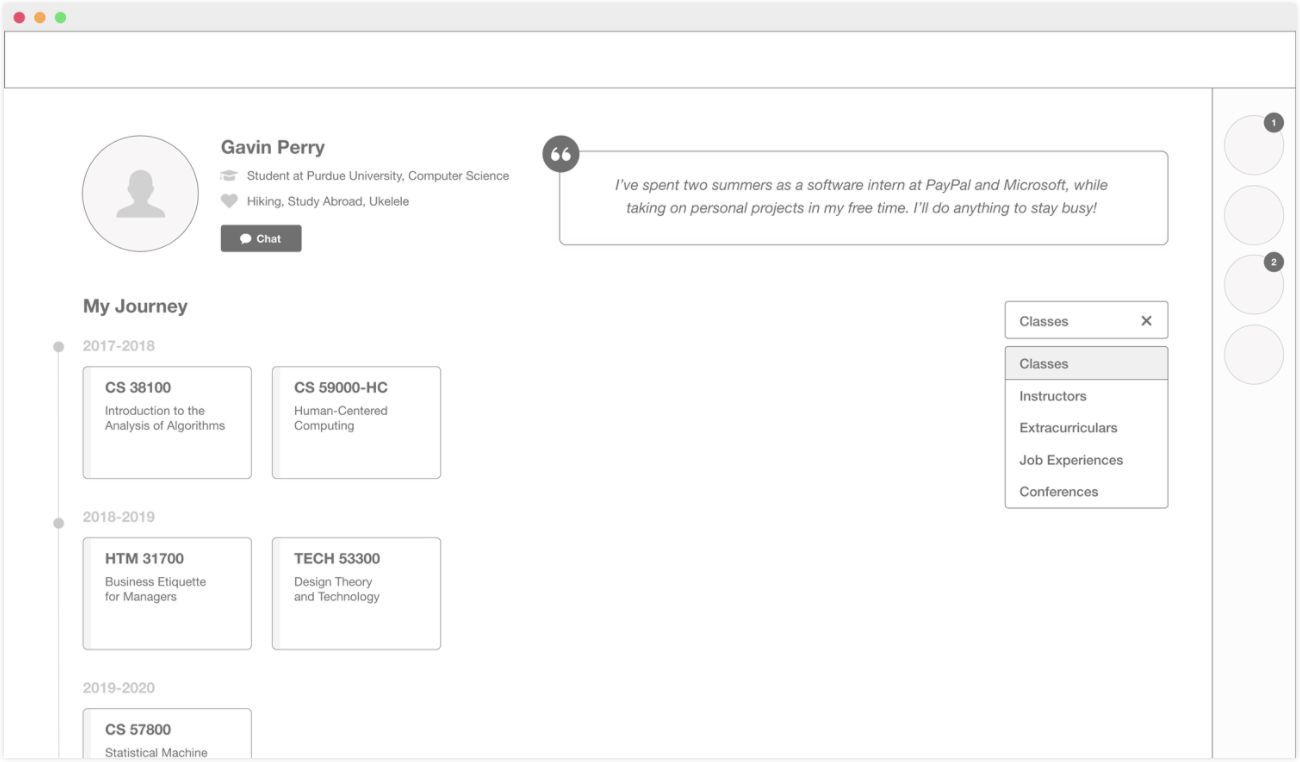
Milestones Filtered by Classes
“I like having the journey to know more about the student experience as well as classes, internships they had and have helped them throughout their journey.”
- High school student, 18

Job Experience Details
“It allows you to still scroll through the rest of the the stuff instead of opening up a new tab.”
- College student, 19

Job Experience Details With Chat
“The chat suggestions and templates are a good way to jumpstart a conversation but they are limiting.”
- College student, 20

Chat Suggestions
“I like having the journey to know more about the student experience as well as classes, internships they had and have helped them throughout their journey.”
- High school student, 18
Actionable Takeaways
1. Rename "My Highlights" to "My Journey" — participants expected to see the ambassador's entire journey, not just key takeaways from college
2. Add a color key for the filters — participants found it hard to remember which color went with each filter
3. Expand the information in the job experience and class panel — many participants wanted to know more about the ambassador's courses, how they tied into real-world jobs, and how difficult the ambassador found them
4. Leverage Microsoft's artificial intelligence (AI) — AI can provide relevant chat suggestions based on common internship and job questions
5. Give ambassadors more control over their time — presentation feedback revealed that some ambassadors might be fielding a large number of students, delaying their responses to new ones
6. Allow additional filters after the initial filter — in interviews and wireframe testing, users wanted more in-depth information about classes specifically (e.g. credits and level of difficulty)
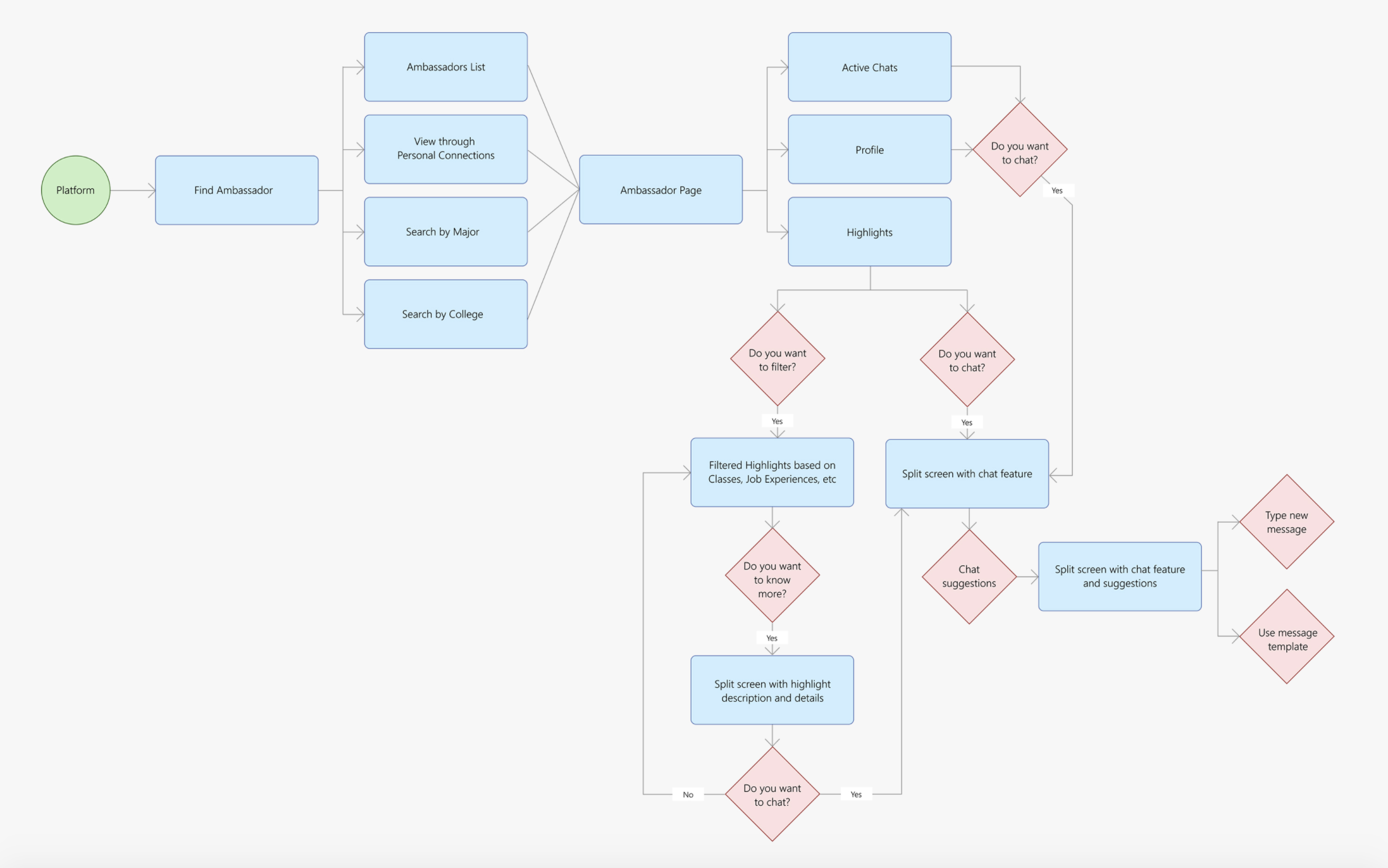
Organizing an Interaction Flow
Before moving to high fidelity, we built an interaction flow to structure the two feature sets (chats and paths) and identify every interaction we had to design. Seeing it as a flow made clear how each screen led to the next.
Testing Our Hi-fi Iteration
To check that the proposed flow was easy to understand and met users' wants and needs, we tested our high-fidelity designs with students in our target group, then synthesized the findings into the actionable takeaways below.
Participants
7 students: high school and college students, ages 18-19
Ambassador Profile
To balance readability between the header and body text, we planned to reorganize the information displayed on the ambassador's job experience cards.
Color Accessibility
We opted for a pastel color palette which sacrificed accessibility. We intended to take another look at our color palette to choose colors that better fit within accessibility standards.
Class Difficulty Dots
During testing, participants were confused by the three dots in the lower left of each class card, indicating the class's level of difficulty. We planned to remove these dots and instead present the information on the split screen view, where more space is available.
"Active" Indicator
We discovered that our users would feel incentivized to chat with an ambassador if he or she was online at the moment. Thus, we planned to add an "Active" indicator to the ambassador's profile page instead of only indicating when the ambassador is offline.
Saved Templates
Originally, we had planned to include the ability autofill a pre-saved template into the chat interface, but this was hard to digest for testing participants. We planned to omit this feature, as it detracted from the natural flow of conversation and did not fit into every chat scenario. Regardless, we would present this concept to Microsoft for future consideration.